Online sessions and access
The demo lets you test online play by inviting players individually and assigning them characters. Participants control only their assigned character; unassigned participants spectate. GMs manage assignments, private visibility, and NPC control. Basic roleplay chat is included. Multiple personal parties, integrated lobbies, and exploration in separate scenes are still in development.
Chat layout and policy
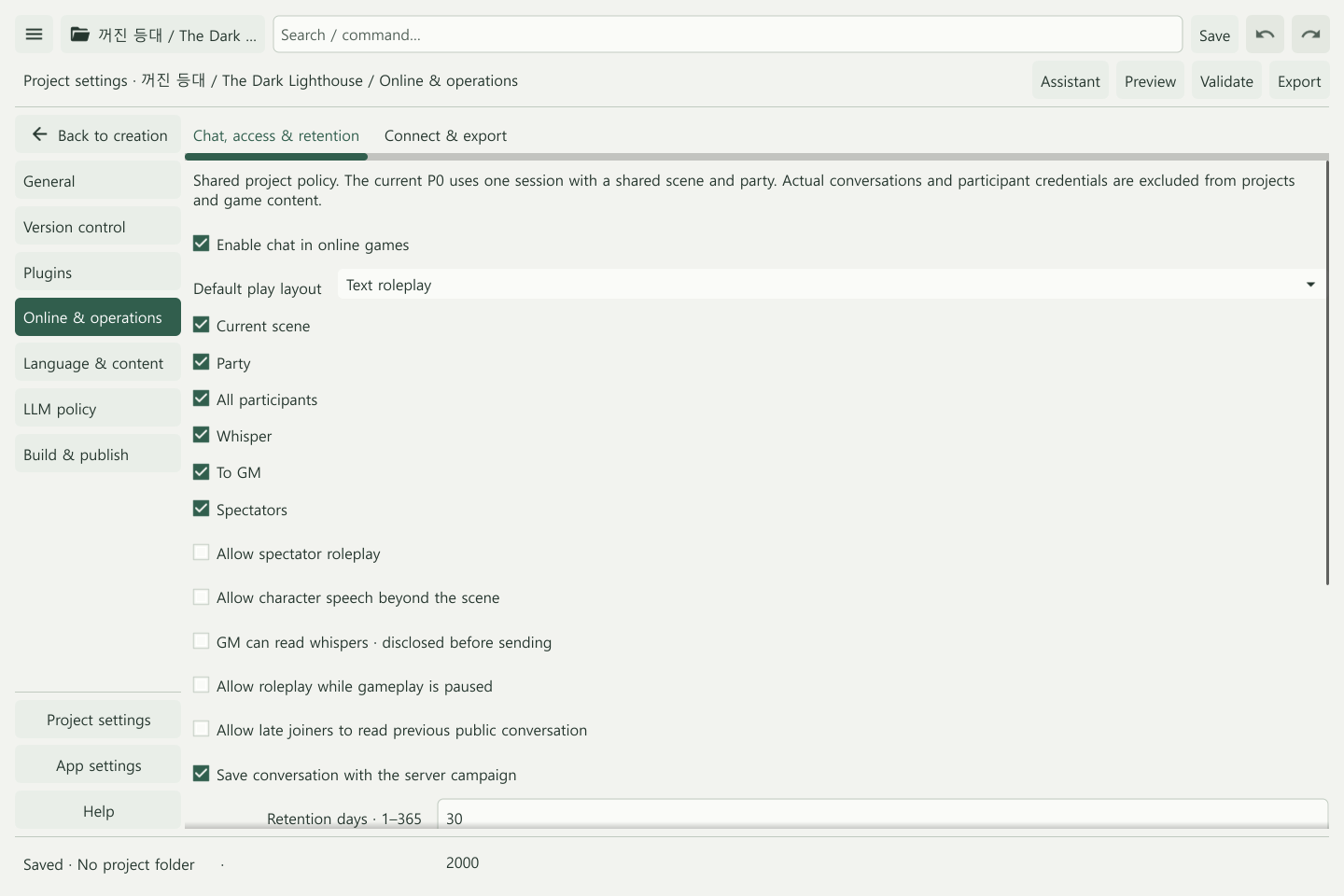
Open Project settings → Online & operations to enable chat and choose its layout and permitted recipients. See Roleplay chat for conversation and records.
Start and restart the server
server.exe -project <project-folder> -operations starts the server with optional operations features. The executable names here are examples for the current demo; follow the package’s launch instructions.
By default, state lives under the operating system’s user configuration folder at Narrafield/server/<project-ID-hash>/session.dat. Use -state <absolute-private-file> for another location. State must be outside the project folder. Only one process can open the same session at a time.
Game state, confirmed roll records, processed command IDs, invitation expiry/revocation, announcements, restrictions, and audit records persist. Successful commands are acknowledged after the replacement state file is written and synchronized. A failed write returns HTTP 503 and preserves committed state. Reusing a command ID with different content or an actor returns HTTP 409; an exact retry does not execute again.
Change content or start a new session
State is tied to project ID, content hash, runtime, and storage schema. Changed content or damaged state prevents startup and preserves the original file. Back up before changes and use a new state path for a new session. General automatic migration and live content replacement are not provided.
The server writes whole-file snapshots for one server process on a local filesystem. Automatic backups, database scaling, and network-filesystem locking are not provided.
Protect state and credentials
DPAPI builds encrypt state for the account running the server. Copying it to a different account or machine is not a portable backup. Other builds can apply owner-only file permissions; check that build’s protection requirements. Keep state and backups private and separate from player packages.
The initial GM and legacy shared-player tokens appear in the protected server console, including after restart. Protect its logs. Tokens are excluded from player state, public packages, and participant listings.
Persistent online sessions draw cryptographic randomness for each die and record confirmed results. Future random state and internal command/roll records are not exposed in participant views. Retried commands do not roll again. Offline reproducible random streams are separate.
External connections and synchronization
Expose external connections through a TLS-enabled HTTPS reverse proxy. The default listener is localhost. Commands and state queries use authenticated HTTP. /events uses WebSocket to send a complete snapshot filtered for the participant, rather than individual field deltas. The client reconnects after a disconnect; expired and revoked credentials are rejected.
Create and revoke invitations
Open Server operations in the editor or run operator.exe -server <HTTPS-URL>, then enter the GM token. The console retains it in memory and rejects remote plaintext HTTP and redirects.
- In Participants, set the participant ID and an expiry within the next 30 days.
- Set Actor ID for an existing instance, or Character definition to create for a new one. Choose one assignment route. New characters are created between combats.
- Select Create invitation and deliver the one-time token to the intended player. An invitation with no assignment grants spectator access.
- Use Assign character ownership to change an existing participant’s character. Their previous character returns to GM control.
- Use Revoke participant token when access should end. IDs cannot be reused; a replacement invitation needs a new ID.
There are at most six active personal credentials. The legacy shared-player token cannot be individually revoked and only controls the original character while its legacy assignment remains. Reassigning that character removes this control. Party access restrictions apply to all player credentials.
All endpoints require a Bearer credential. Participant management remains GM-only even without optional operations features.
| Endpoint | Purpose |
|---|---|
POST /participants/invite |
Set id, expires, and optional actorId or characterId; return the token once |
GET /participants |
List assignment, expiry, and revocation without tokens |
POST /participants/assign |
Assign a character to an existing participant |
POST /participants/revoke |
Revoke an ID; later use is rejected, including after restart |
Private notes and GM control
Players use My private note; the GM uses Edit participant private view for notes and personal lore visibility. Notes are visible to their participant and the GM. Each participant sees the inventories, resources, and private lore they are allowed to view.
In GM actors & AI, use Refresh actors & definitions, select an actor, then GM manual control, Return control to AI, Pause AI / Resume AI, or the selected actor’s GM play view. The server still checks control and the current turn. Automatic actions and delegated control for absent players are not yet complete.
Runtime images
GET /media?path=<encoded-managed-image-path> serves verified, referenced images after authentication. Players can request only their current scene’s background and portrait; later-scene images return HTTP 404. GM requests remain limited to referenced project images.
Verification and limits
Local automated tests cover ownership, private views, persistence, duplicate commands, WebSocket reconnect, and credential revocation. Real sessions with several players on external networks still need testing. External connectivity, latency, load, accessibility, integrated lobbies, multiple personal parties, split exploration, identity recovery, and server transfer require further work.
Play and export · Troubleshooting · Planned parties and campaigns
Planned conversation and session management
The instructions above cover current demo connections, assignments, and persistence. Basic roleplay chat is a first-release goal. Lobby preparation, session endings, chapters, campaign completion, and update recovery are described in Campaign continuity.